

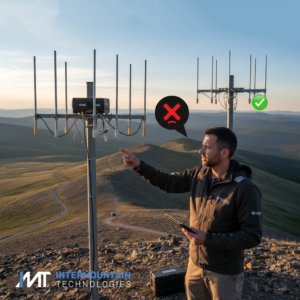
In the world of Rajant Kinetic Mesh®, your network is only as strong as its physical installation. Even the most powerful BreadCrumb® node can’t overcome poor signal propagation caused by basic mounting errors. At Intermountain Technologies, we see these three common pitfalls frequently. Use this guide to ensure your deployment delivers maximum throughput and reliability.
1. The Antenna “Shadowing” & Spacing Trap
The Mistake: Mounting antennas too close to metal masts, cabinets, or each other.
-
Why it matters: Metal objects act as reflectors or shields. If an antenna is “hugging” a metal pole, its radiation pattern becomes distorted, creating dead zones. Additionally, placing multiple antennas (like a 2.4GHz and 5GHz) too close together can cause “near-field” interference, where one radio desensitizes the other.
-
The Fix: * Maintain at least 12–18 inches (30–45 cm) of separation from vertical metal structures.
-
Ensure antennas on the same node are spaced according to Rajant’s recommendations (typically at least 20 cm apart) to prevent interference.
-
Always aim for a clear Line-of-Sight (LoS) and respect the Fresnel Zone (the elliptical space around the signal path).
-
2. Connector & Weatherproofing Neglect
The Mistake: Leaving RF connectors exposed or failing to use “drip loops.”
-
Why it matters: Moisture is the silent killer of wireless networks. Even a tiny amount of water ingress into a connector can cause “impedance mismatch,” leading to signal loss or permanent hardware damage.
-
The Fix:
-
Always use weatherproofing: Use cold-shrink tubing or high-quality silicone self-amalgamating tape on all outdoor RF connections.
-
The Drip Loop: Always create a small downward loop in the cable before it enters a node or a building. This ensures gravity pulls rainwater away from the connector rather than funneling it straight into the seal.
-
Don’t over-tighten: Hand-tighten connectors first, then use a torque wrench to meet manufacturer specs. Over-tightening can crush the internal pin.
-
3. Polarization & Orientation Errors
The Mistake: Mounting omnidirectional antennas at odd angles or mixing polarizations.
-
Why it matters: Most Rajant mobile deployments use Vertical Polarization. If your infrastructure antenna is vertical but your mobile node’s antenna is tilted at 45 degrees, you can lose up to 20 dB of signal strength—that’s a massive drop in range and speed.
-
The Fix:
-
Stay Vertical: Ensure all antennas are perfectly plumb (vertical). On mobile equipment like shovels or haul trucks, use heavy-duty spring mounts to help antennas return to vertical after hitting obstructions.
-
Height is King: Whenever possible, mount antennas at the highest point of the equipment to clear the “ground clutter” and nearby obstructions.
-
Pro-Tip for Field Techs:
Before you leave the site, use BC|Commander® to check the Signal-to-Noise Ratio (SNR) and Link State. If a node has a poor link despite being physically close, go back and check the connectors!
Need help optimizing your mesh? The team at Intermountain Technologies specializes in rugged, high-performance Rajant deployments. Reach out to us for a site audit or technical support at 801-716-7777!